Exports
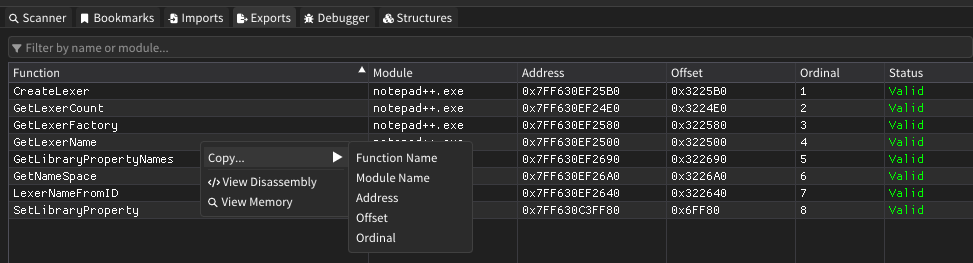
The Exports window displays all exported functions from loaded modules within the target process. It provides a comprehensive view of publicly available functions that can be called by other modules, making it essential for understanding module interfaces and API availability.
Features
Function Information Display
- Function Names: Complete list of exported function names from all loaded modules
- Module Organization: Functions grouped by their containing modules for easy navigation
- Address Resolution: Virtual memory addresses where exported functions are located
- Ordinal Numbers: Numeric identifiers used for function lookup in the export table
- Status Validation: Verification of export table integrity and function availability
Advanced Filtering
- Real-Time Search: Filter exports by function name or module name with instant results
- Case-Insensitive Matching: Flexible text matching for easier function discovery
- Multi-Criteria Support: Search across both function names and module names simultaneously
Sorting Capabilities
- Multi-Column Sorting: Sort by function name, module, address, offset, or ordinal
- Hierarchical Organization: Maintains logical grouping of functions within modules
- Ascending/Descending: Toggle sort direction for any column
Navigation Integration
- Memory Browser: Jump directly to function addresses in the hex editor
- Disassembly View: Examine function code in the disassembly window
- Context Menus: Quick access to common operations via right-click menus
How It Works
The Exports window operates by parsing the export tables of loaded PE modules:
Export Table Parsing
- PE Header Analysis: Reads export directory from module headers
- Function Enumeration: Extracts all exported function names and addresses
- Ordinal Resolution: Maps ordinal numbers to function names and addresses
- Forward Resolution: Identifies and displays forwarded exports to other modules
Dynamic Loading
- Module Detection: Automatically refreshes when new modules are loaded
- Address Calculation: Resolves virtual addresses based on module base addresses
- Validation Checks: Verifies export table integrity and function accessibility
User Interface
Main Table Columns
| Column | Description |
|---|---|
| Function | Name of the exported function |
| Module | Name of the module containing the function |
| Address | Virtual memory address of the function |
| Offset | Offset from the module's base address |
| Ordinal | Numeric identifier in the export table |
| Status | Validation status or forwarding information |
Filter Controls
- Search Input: Enter text to filter by function or module name
- Real-Time Results: Table updates immediately as you type
- Clear Indication: Empty results when no matches are found
Status Indicators
- Valid: Green text indicating properly exported functions
- Invalid Ordinal: Red text for corrupted or invalid export entries
- Forwarded: Orange text showing the target of forwarded exports (e.g., "-> kernel32.CreateFileA")
Context Menu Operations
Right-click any export to access:
- Copy Options: Copy function name, module name, address, offset, ordinal, or forwarding target
- View Disassembly: Open the function in the disassembly window for code analysis
- View Memory: Navigate to the function address in the hex editor
- Analysis Tools: Quick access to related memory analysis features
Advanced Features
Forwarded Exports
- Forward Detection: Automatically identifies exports that redirect to other modules
- Target Display: Shows the actual destination of forwarded functions
- Chain Resolution: Handles complex forwarding chains between multiple modules
Export Validation
- Ordinal Verification: Checks for valid ordinal numbers in export tables
- Address Validation: Ensures function addresses are within valid module boundaries
- Integrity Checking: Identifies corrupted or manipulated export tables
Module Integration
- Cross-Reference Support: Links exports with import tables from other modules
- API Analysis: Helps identify available system APIs and their entry points
- Dependency Mapping: Understand inter-module relationships through export usage
Usage Tips
- Use the filter to quickly locate specific functions or examine exports from particular modules
- The ordinal column is particularly useful for analyzing packed or obfuscated executables
- Forwarded exports (marked with "->") indicate API redirection patterns common in Windows system DLLs
- Sort by address to understand the memory layout of exported functions within modules
- Use "View Disassembly" to examine function prologues and implementation details
- The offset column helps with static analysis by providing module-relative addresses
- Pay attention to invalid ordinals as they may indicate anti-analysis techniques or corruption
- Combine with the imports window to understand complete API usage patterns