Strings
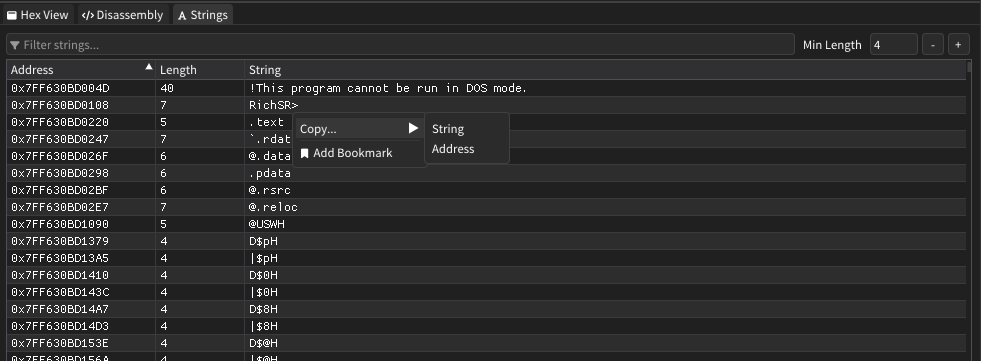
The Strings window provides comprehensive string extraction and analysis capabilities for examining text data within process memory. It automatically discovers and displays ASCII strings from selected memory regions or pages, offering filtering and bookmarking features for efficient string analysis.
Features
String Extraction
- Automatic Discovery: Extracts all printable ASCII strings from selected memory regions
- Configurable Length: Set minimum string length threshold to filter out noise
- Real-Time Processing: Updates string list automatically when selection changes
- Memory Coverage: Processes all mapped and accessible pages within the selection
Filtering and Search
- Text Filter: Search through extracted strings using case-insensitive matching
- Length Control: Adjust minimum string length from 1 to any desired value
- Dynamic Updates: Filter results update instantly as you type
- Performance Optimization: Uses efficient rendering for large string collections
String Management
- Direct Bookmarking: Click any string to create a memory bookmark automatically
- Context Actions: Right-click for copy and bookmark options
- Address Display: Shows the exact memory address where each string is located
- Length Information: Displays character count for each discovered string
How It Works
The Strings window operates by scanning through the selected memory region or page byte-by-byte, identifying sequences of printable ASCII characters (characters 32-126). When a non-printable character is encountered, any accumulated string meeting the minimum length requirement is added to the results.
The extraction process only examines mapped and accessible memory pages, automatically skipping protected or unmapped regions. Results are cached and only refreshed when the memory selection changes or settings are modified.
User Interface
Filter Controls
| Component | Description |
|---|---|
| Filter Input | Text search field for filtering displayed strings |
| Min Length | Numeric input to set minimum string length threshold |
Strings Table
| Column | Description |
|---|---|
| Address | Virtual memory address where the string begins |
| Length | Number of characters in the string |
| String | The actual string content found in memory |
Interaction Features
- Click to Bookmark: Single-click any string row to create a memory bookmark
- Context Menu: Right-click for additional copy and bookmark options
- Tooltip Guidance: Hover tooltips explain available actions
- Efficient Scrolling: Large string lists render smoothly with virtual scrolling
Advanced Features
Selection Integration
- Region Mode: When a memory region is selected, scans all accessible pages within that region
- Page Mode: When a specific page is selected, scans only that individual page
- Auto-Update: Automatically refreshes string list when memory selection changes
- Status Indication: Clear feedback when no valid memory selection is available
Performance Optimization
- Cached Results: Extracted strings are cached until selection or settings change
- Virtual Rendering: Only visible strings are rendered to maintain UI responsiveness
- Memory Efficiency: Processes memory in chunks to minimize resource usage
- Smart Filtering: Filter processing operates on pre-extracted results for speed
Copy and Export
- String Copy: Copy string content directly to clipboard
- Address Copy: Copy memory addresses in hexadecimal format
- Bookmark Integration: Seamless integration with the bookmarking system
- Multiple Formats: Context menu provides various copy options
Usage Tips
- Start by selecting a memory region or page from the Regions window to populate string results
- Adjust the minimum length filter to reduce noise from short, meaningless character sequences
- Use the text filter to quickly locate specific strings or patterns within the results
- Click any string to instantly bookmark it for later analysis or monitoring
- Higher minimum length values (6-8 characters) often reveal more meaningful strings
- Combine with other analysis windows for comprehensive memory examination
- Right-click strings for additional copy options when you need to extract specific information
- The address column helps correlate strings with their location in hex or disassembly views
- Filter by common prefixes or suffixes to identify related strings or data structures
- Pay attention to strings near each other in memory - they may be part of the same data structure