Structures
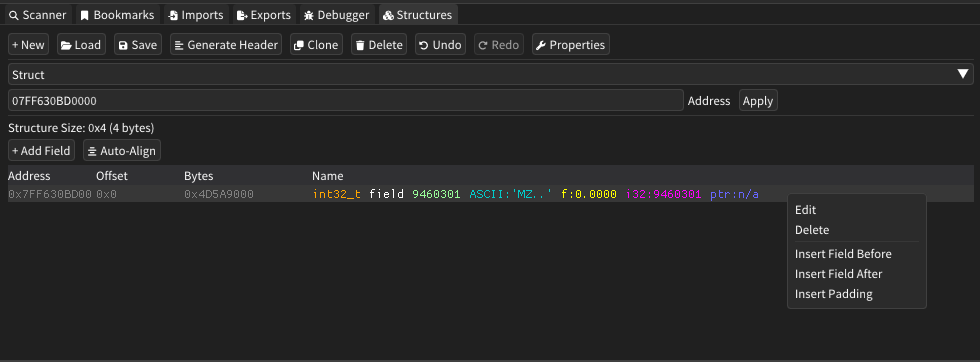
The Structures window provides powerful memory structure analysis capabilities for defining, editing, and visualizing data structures within process memory. It allows users to create custom structure definitions, apply them to memory locations, and interpret raw memory data through structured field layouts.
The design and functionality is heavily inspired from projects such as Reclass.NET.
Features
Structure Definition
- Custom Data Types: Support for primitive types (integers, floats, booleans, characters)
- Complex Types: Arrays, vectors, pointers, and custom nested structures
- Field Management: Add, edit, delete, and reorder structure fields
- Automatic Alignment: Built-in padding and alignment calculation tools
- Size Calculation: Real-time structure size computation and display
Memory Interpretation
- Live Data Display: View actual memory values interpreted through structure fields
- Multiple Representations: Display values as hex, ASCII, floats, integers, and pointers
- Address Mapping: Apply structures to specific memory addresses
- Visual Highlighting: Color-coded field types and zero-value detection
- Real-Time Updates: Memory values update automatically as underlying data changes
Structure Management
- Multiple Structures: Create and manage multiple structure definitions
- Clone and Modify: Duplicate existing structures for variations
- Import/Export: Save and load structure definitions to/from files
- Header Generation: Export structures as C/C++ header files
- Undo/Redo: Complete command history for all editing operations
How It Works
The Structures window operates by overlaying user-defined data structure templates onto raw memory data at specified addresses. It reads memory through the mapped virtual address space and interprets byte sequences according to the defined field types, sizes, and offsets.
The system maintains structure definitions independently of memory content, allowing the same structure template to be applied to different memory locations for comparative analysis or pattern recognition.
User Interface
Toolbar Controls
| Component | Description |
|---|---|
| New | Create a new empty structure definition |
| Load | Import structure definitions from saved files |
| Save | Export current structure definition to file |
| Generate Header | Create C/C++ header file from structure |
| Clone | Duplicate the current structure for modification |
| Delete | Remove the current structure definition |
| Undo/Redo | Navigate through editing command history |
| Properties | Edit structure name and description |
Structure Editor
| Component | Description |
|---|---|
| Structure Selector | Dropdown to choose between multiple defined structures |
| Address Bar | Input field to specify memory address for structure overlay |
| Size Display | Shows total structure size in bytes and hexadecimal |
| Add Field | Button to create new fields within the structure |
| Auto-Align | Automatically insert padding for proper memory alignment |
Fields Table
| Column | Description |
|---|---|
| Address | Absolute memory address of each field |
| Offset | Relative offset from structure base address |
| Bytes | Raw hexadecimal representation of field data |
| Name | Field definition with type, name, and interpreted value |
Field Editor Dialog
- Field Properties: Name, data type, size, and array configuration
- Custom Types: Support for user-defined structure types
- Offset Control: Manual offset specification for precise field placement
- Comments: Documentation and notes for individual fields
Advanced Features
Data Type Support
- Primitive Types: Int8/16/32/64, UInt8/16/32/64, Float, Double, Bool, Char, WChar
- Array Types: Fixed-size arrays for characters, wide characters, and byte sequences
- Vector Types: 2D, 3D, and 4D vector support for graphics and mathematical data
- Special Types: Padding bytes, generic pointers, and custom nested structures
Memory Analysis Tools
- Multi-Format Display: Simultaneous ASCII, float, integer, and pointer interpretation
- Zero Detection: Visual highlighting of null or zero-valued fields
- Color Coding: Distinctive colors for data types, field names, and values
- Context Menus: Right-click field operations including edit, delete, and insert
Structure Operations
- Field Insertion: Add fields before, after, or at specific positions
- Padding Management: Automatic and manual padding field insertion
- Offset Recalculation: Automatic structure layout updates after modifications
- Validation: Field overlap detection and size validation
Import/Export Features
- Binary Format: Efficient native format for structure definitions
- Header Generation: C/C++ compatible structure declarations
- Cross-Session Persistence: Save and restore complex structure definitions
- Template Sharing: Export structures for use in different analysis sessions
Usage Tips
- Start by defining the basic structure layout before applying to memory addresses
- Use the auto-align feature to ensure proper memory alignment for target architectures
- Apply structures to known data locations first to validate field definitions
- Leverage the undo/redo system when experimenting with structure layouts
- Use custom types for nested structures and complex data hierarchies
- Export frequently used structures as templates for future analysis sessions
- Pay attention to the multi-format value display to identify data patterns
- Use padding fields to account for compiler alignment in reverse-engineered structures
- Clone structures when creating variations of similar data layouts
- Generate header files to document discovered structures for development use