Imports View
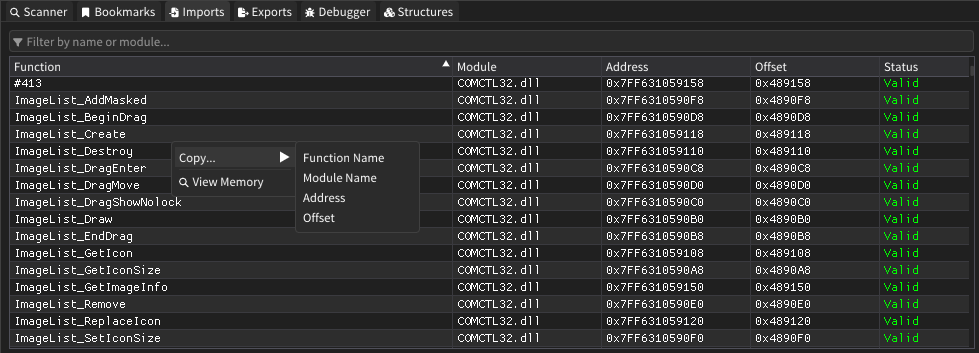
The Imports View window displays all imported functions and modules used by the target process. It provides a comprehensive overview of external dependencies, allowing users to analyze function calls, module relationships, and import address table (IAT) entries with advanced filtering and sorting capabilities.
Features
Import Display
- Function Listing: Complete list of all imported functions organized by module
- Module Grouping: Functions are grouped by their respective DLL or module source
- Address Information: Shows both function addresses and offset values
- Status Indicators: Visual feedback indicating import validity and resolution status
Advanced Filtering
- Real-Time Search: Filter imports by function name or module name instantly
- Case-Insensitive Matching: Search works regardless of text case
- Partial Matching: Find functions with partial name matches
- Module-Specific Filtering: Quickly locate all functions from specific modules
Table Management
- Sortable Columns: Click any column header to sort data ascending or descending
- Multi-Column Sorting: Complex sorting with multiple criteria support
- Resizable Columns: Adjust column widths to fit your display preferences
- Scrollable Interface: Handle large import tables with smooth scrolling
Data Export
- Clipboard Integration: Copy function names, module names, addresses, or offsets
- Selective Copying: Right-click context menu for targeted data extraction
- Multiple Format Support: Export addresses in hexadecimal format
How It Works
The Imports View analyzes the target process's Import Address Table (IAT) and import directory structures to enumerate all external function dependencies. It resolves function addresses, maps them to their respective modules, and provides real-time status information about import resolution.
User Interface
Main Display Area
| Column | Description |
|---|---|
| Function | Name of the imported function |
| Module | Source DLL or module containing the function |
| Address | Virtual memory address where the function is loaded |
| Offset | Relative offset within the import table |
| Status | Current resolution status (Valid/Invalid) |
Filter Controls
- Search Bar: Located at the top with filter icon and placeholder text
- Live Updates: Results update immediately as you type
- Clear Functionality: Easy clearing of filter text for full view
Sorting System
- Column Headers: Click any column to sort by that criteria
- Direction Indicators: Visual arrows show current sort direction
- Stable Sorting: Maintains relative order for equal values
Right-Click Context Menu
- Copy Options: Submenu with multiple copy formats available
- Memory View: Direct navigation to function address in memory
- Address Linking: Integration with other analysis windows
Advanced Features
Intelligent Sorting
- Function-First Sorting: Primary sort by function names within modules
- Module-Level Organization: Secondary sort maintains module grouping
- Address-Based Sorting: Sort by memory addresses for layout analysis
- Offset Sorting: Organize by import table position
Context Integration
- Memory Navigation: Right-click "View Memory" opens hex view at function address
- Cross-Reference Support: Links with other analysis windows
- Address Synchronization: Coordinates with memory exploration tools
Data Validation
- Import Resolution: Real-time validation of function address resolution
- Module Verification: Confirms module loading and accessibility
- Status Monitoring: Continuous monitoring of import table integrity
- Error Detection: Identifies broken or missing imports
Usage Tips
- Use the filter bar to quickly locate specific functions or narrow down to particular modules
- Sort by module name to group related functionality together for analysis
- Right-click any import to quickly copy its details or navigate to its memory location
- The address column helps identify import table layout and potential hooking targets
- Status indicators help identify problematic imports that may affect program execution
- Combine with other memory analysis windows for comprehensive reverse engineering
- Filter by common API categories (kernel32, user32, etc.) to focus on specific functionality
- Use the offset column to understand import table structure and organization
- Copy function names for use in scripting or external analysis tools